Has it ever happened to you that you needed to type something in Nepali in a hurry, but your keyboard didn’t have Devanagari script? Or did you want the old-fashioned Preeti font in Word or PageMaker, but couldn’t type? If so, you’re not alone. Thousands of Nepali users face this same problem every day while creating documents in the office, completing school or college assignments, or writing on social media.
To solve this problem, we have created Roman Nepali to Preeti Font Converter A tool that will really make your everyday life easier.
What exactly is this tool?
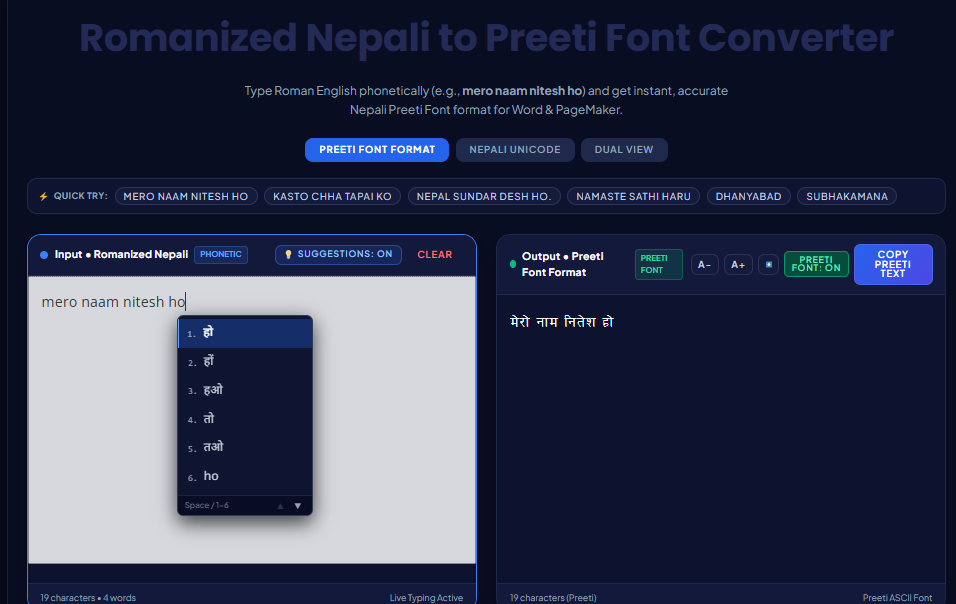
Simply put, just like you normally type Nepali text in English letters on your mobile or keyboard, such as “mero naam nitesh ho,” this tool instantly converts it to the correct Nepali Preeti font format, which can be pasted directly into Word or PageMaker. You can also convert it to Unicode (Devanagari) format, or view both simultaneously.
This means there’s no more typing hassle. Simply type in English, and the tool will do the rest.
For whom is it beneficial?
- people working in the officeThose who have to type documents, notices or reports in Nepali on a daily basis
- students, who prepare assignments or projects in Preeti font in Word
- People involved in printing and publishing, who still have to work with the old PageMaker format
- All those who find it difficult to use the Devanagari keyboard, but it has to be written correctly in Nepali
Some highlights of the tool
1. Phonetic typingYou just have to type it exactly as you speak. If you type “namaste” it becomes “namaste”, if you type “kasto chha” it becomes “kasto chha” no need to remember any special rules.
2. Live Typing SuggestionsAs you type, suggestions appear, similar to Google Translate. Even if a word is spelled slightly differently, you’ll still have the option to choose the correct word.
Read More
Preeti to Unicode: Best Nepali Typing Tool
Top 5 Nepali Unicode Converters 2026: Compare Best Tools Online
3. Output in three formats
- Preeti Font Format (for Word and PageMaker)
- Nepali Unicode (Devanagari)
- Both together (Dual View)
4. QuickType buttonsIf you don’t feel like typing, you can click on the sample phrase above to quickly see how the conversion works.
5. Download and copy facilityCopy the output with one click or download it as a text file – whichever suits you.
How easy it is to use
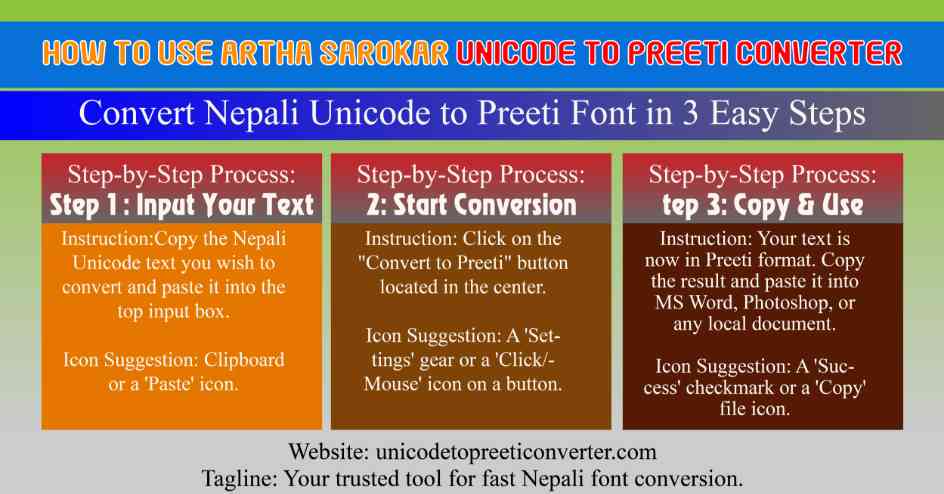
It’s done in just three steps:
- Type Nepali in Roman in the box on the left
- The converted text in Preeti font will appear immediately on the right side.
- Press the “Copy” button and paste it into your Word document
That’s it. No software downloads, no installation hassles. Just open it in your browser and get started.
Why we made it
Typing in Nepali is still a challenge for many people, especially those unfamiliar with the Devanagari keyboard layout. In the past, people used to type in the Preeti font by directly pressing the ASCII keys, which took a lot of time to learn. We thought—why not create a tool that does all this automatically, and for free, without the hassle of logging in or signing up.
If you frequently type in Nepali and struggle with the Preeti font or Unicode, give this tool a try. We’re sure it’ll become a part of your daily typing routine once you try it.
The tool is live now – go start typing now and feel the difference for yourself.
Related Tools