Our top picks: Unicode To Preeti Converter Online Signature Maker (The easiest and fastest tool) If you want to download a great digital signature in just a few seconds without any hassle, without any login (Sign Up) or without paying any money, then visit our website.
Table of Contents
Online Signature Maker Too lThis is the best option for you. We’ve made it free for everyone, so you can use it as many times as you want. We’ve designed it to be extremely simple, keeping the customer in mind. You can use it easily, 100% free. Online Signature Maker Tool Is.
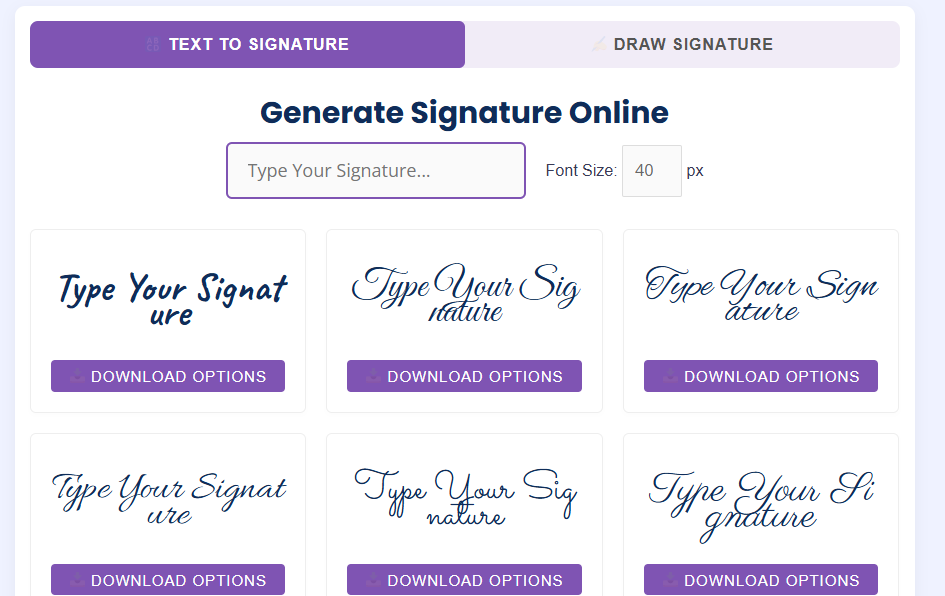
- Features:
- 100% Free & No-Login: You don’t need to enter your email address or phone number. Simply visit the site and create your signature instantly.
- Game Smooth Drawing Pad online. Its interface is so amazing that you can draw fine and clear signatures just like a real pen with the help of your mouse, laptop touchpad or finger on the mobile screen.
- Color and Thickness Customization: You can change the color of your signature (black, blue, red, etc.) and also adjust the thickness of the pen as per your choice.
- Instant Transparent PNG Download: In a single click, your signature gets downloaded in high-quality PNG format without any transparent background, which you can easily embed on any government or private PDF form, Word file or invoice.
It is best for all students, freelancers and professionals who want a clean and secure e-signature instantly without downloading bulky software.
About 5 Free Online Signature Tools
Everything is digital these days. Whether it’s official office documents, business contracts, or college admission forms, paper has been replaced by digital files like PDFs, JPGs, Word, and more. Repeatedly printing out documents, signing them with a pen, and then scanning and sending them back is a huge time-consuming process.
We often need to quickly add our signatures to various office tasks. Sometimes, for customers who use graphics design, Microsoft Word or Excel software, or for office work, or to modify documents to suit a customer, signatures are crucial. To address this issue, there are other online signature software available that work very well. This entire blog is about them.
To solve this problem Online Signature Maker There are plenty of tools available to help you create a professional digital signature in just seconds, right on your computer or mobile screen. The steps below are detailed below.If you also use a highly secure digital signature tool for your work, then this article is for you.
Today, we Top 5 Free Online Signature Makers of 2026 I’ll talk in detail about these five tools, which are incredibly easy to use and completely free. I’m sure you’ll love these five tools.
What is an Online Signature Maker?
Online signature maker is a web-based tool or software that allows you to create your signature directly on the digital screen without any pen and paper and also provides the option to download it without any hassle.
These tools typically give you the option to create a signature in two ways:
- Draw Signature: In this you can draw your original sign with the help of your mouse, touchpad or finger/stylus on the mobile screen.
- Type Signature: In this you type your name, and the tool converts your name into different stylish fonts, which looks exactly like a real signature.
Once the signature is created, you can PNG or JPEG You can download it in .pdf format and easily paste it on any document.
Top 5 Free Online Signature Makers in 2026
While there are many tools available in the market, the following 5 tools are performing the best in 2026 in terms of security, features, and easy interface:
1. Canva Signature Generator
Canva is known to every graphic designer and is a trusted website for teachers, website developers, or anyone with other skills like t-shirt design, logo design, business card design, etc. It’s known worldwide for graphic design, but its ‘Free Signature Generator‘ tool is also excellent. If you want to give your signature a very attractive and professional look, it’s the best choice.
- Key Features:
- In this you can draw and type the sign also.
- There is a facility to keep the background of the signature transparent, so that it can be placed on any color document.
- You can also use the converted signature directly in Canva Docs.
- It allows you to download in multiple formats like PNG, JPEG and SVG.
2. SignWell
As far as I knowIt was previously known as ‘Docsketch.’ SignWell is a tool with a very simple and clean interface. If you don’t just want to download a signature image, but also want to sign a document online and send it to someone, this tool is very useful.
- Features:
- Its free plan is free forever, allowing you to easily sign and send three documents per month. I think three documents per month is a bit low.
- It provides a completely secure audit trail, which is legally valid.
- It is so easy to use that even a new user can understand it in 1 minute without any guide.
3. PandaDoc
If you’re looking to digitally sign a large business deal or legal contract, PandaDoc is a great choice for security. Its free eSign plan is quite popular in 2026.
- Features:
- Its free plan allows you to sign 60 documents per year for free.
- It uses completely secure encryption technology.
- With this you get a ‘Certificate of Completion’, which proves that the signature is completely genuine and legally valid (ESIGN & UETA Compliant).
4. Adobe Acrobat Sign
Adobe is a big company. We were familiar with the name Adobe since we were young. Now this company has progressed a lot and is included in the big name.There’s no bigger name in the PDF world than Adobe. Adobe Acrobat’s online signature tool is ideal for those who frequently work with PDF files.
- Features:
- You can upload your PDF file directly into the browser and draw your signature on it.
- Its mobile app is also available, through which you can scan and sign documents on the go (On the Go) using your smartphone camera.
- Its brand value and security can be trusted blindly.
5. HubSpot Email Signature Generator
If you want to create a stunning and eye-catching ‘Email Signature‘ to put at the bottom of your business emails (like Gmail or Outlook), not just for your regular documents, then this tool from HubSpot is number one.
- Features:
- It is completely free and does not require an account.
- In this you can add your photo, company logo, social media links and your stylish typed signature together.
- This gives your email a very professional and corporate look.
Comparison Table: Which Tool is Best for You?
| Tool name | Why is it the best? | Limitations of the free plan | Main formats/uses |
| Canva | For customization and stylish fonts | Lifetime Free (Basic) | PNG, JPEG, SVG |
| SignWell | Easy interface and quick sharing | 3 documents per month | Direct Online Sign |
| PandaDoc | For legal documents and security | 60 documents per year | PDF and Word |
| Adobe Acrobat | For PDF integration | Basic signing free | PDF files |
| HubSpot | Professional Email for Outlook | 100% Free | Email Footers |
How to create a digital signature online?
Creating a signature using any online signature maker tool is extremely simple. You can follow these 4 easy steps:
- Select a tool: Visit the website of any of the preferred tools above (like Canva or SignWell).
- Select Signature Mode: Decide if you want to sign Draw or want to make your name Type Want to choose stylish fonts by.
- Customize: Adjust the color (black or blue), line thickness, and size of your signature as per your needs.
- Download: Click on the download button. Always remember to keep the signature PNG (Transparent Background) Download it in the same format so that when you paste it into a document, the white background doesn’t hide your text.
Are online signatures legally valid?
This is a question that comes to everyone’s mind. The answer is simple: Yes, electronic or digital signatures are completely legally valid. of India IT Act 2000 and America’s ESIGN Act Under the Statute of Rights, digital signatures have the same legal status as handwritten signatures.
However, for large government documents, wills, or court cases, physical signatures or signatures with a Digital Signature Certificate (DSC) are still preferred. For general business transactions, invoices, offer letters, and agreements, these online signatures are perfectly valid.
Conclusion
An online signature maker not only saves you precious time but also helps save the environment by preventing paper wastage (Paperless Workflow).
If you just want to download a beautiful sign for one time, you can Canva If you need to send official contracts to clients, you can use PandaDoc or SignWellIt will prove to be the safest and best option for you.
So what are you waiting for? Create your digital signature today and make your work smart and modern!
Frequently Asked Questions (FAQs)
Q1. Is it safe to use an online signature maker?
Yes, provided you’re using a reputable and secure platform like PandaDoc or Adobe. These tools keep your data encrypted.
Q2. What is a Transparent Signature?
This means that your signature doesn’t have a white background behind it. When you place it on a document, the original background of the document remains intact. The PNG format offers this feature.
Q3. Can I create a digital signature from my phone?
Absolutely! All of the tools mentioned above work just as well on mobile browsers. Drawing a sign with your finger on a mobile screen is even easier than using a mouse.