
Summary
In this, we will learn how to convert JPG image to PDF from Android device, there are online and offline methods for this, you will be able to learn through these two methods.
Taking a photo may be a simple task, but converting it to PDF becomes even easier when you use an online tool. The Unicodetopreeticconverter site is completely free. There are many tools available on this site, such as JPG to PNG, JPG to Webp, PNG to JPG, Webp to JPG, Compress Image to 50KB, and many more, which you can see in the image.
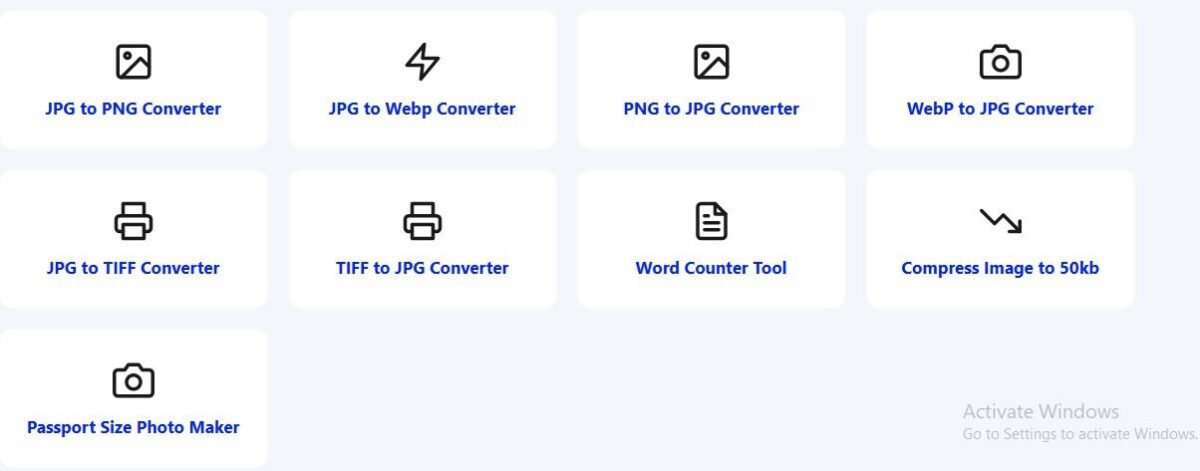
No need to download any third party apps, just install it in your Android or computer browser.unicodetopreeticonverterUse it anywhere, anytime to convert JPG to PDF for free without losing image quality
How to convert PNG to JPG image
When it comes to converting JPG and PNG images to PDF, we have many options. Whether you prefer to do it on a computer or Android, here’s how to create a PDF the right way.
How to use the online JPG to PDF converter
unicodetopreeticonverter.com Online tools like the website provide a convenient way to convert JPG to PDF:
- Upload your PNG image or JPG file
- Once uploaded, click on Convert PDF.
- Then you can download the PDF file by clicking on the download button.
This tool is known for everything from converting image formats to other formats, cropping PDFs, splitting PDF files, or creating passport-size images. This website offers the best tools for each task.
How to use unicodetopreeticonverter.com website
- First, open the website on your computer or Android or iOS mobile phone.
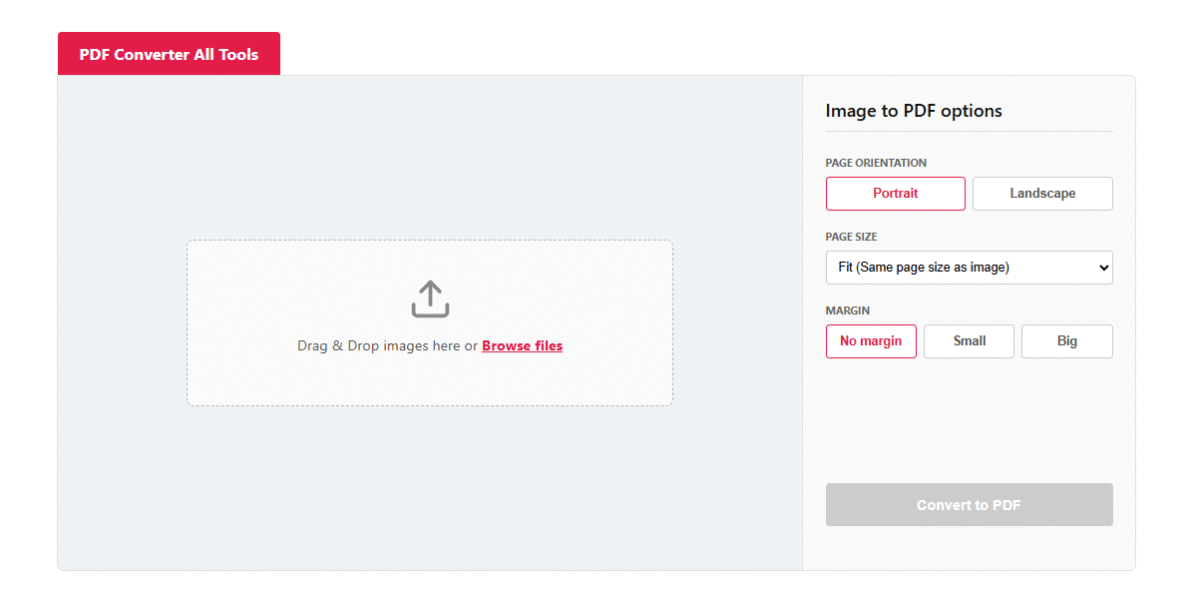
- After the website opens, click on the menu and then click on PDF Converter Online Tools.
- After opening, you will see the image to PDF converter tool there, by clicking on it
- Upload the image and click on convert to PDF
- Then click on the download button to download the PDF file.
Importance of PDF format and its benefits
There are many benefits of converting PDF files. Whenever I have to give documents to someone, I often create a PDF file. I know how to create PDF files using any method, whether it’s Microsoft Office, Corel Draw, Photoshop, or any other method. If this is necessary, I create PDF files.Let’s take a look at its main advantages:
- The format does not change: Image files can often lose alignment when opened on different devices (like a phone, tablet, or laptop), but PDFs look the same on every screen. It doesn’t change.
- Security: I often password protect PDF files containing personal documents; you can also password protect them.
- Multiple Pages: You can combine multiple separate images into a single PDF file, or more than two, by clicking here.You can merge PDF files.
- Reduced size: PDF files take up less storage space than images and are easier to send via email or WhatsApp.
How to convert JPG to PDF for free?
unicodetopreeticconverter.com is a free website. There’s no login required, nor is there a need to submit a mobile number. The tool is completely free. The easiest and safest way is to use an online tool. If you want to convert your photo to PDF without downloading any apps or spending any money, this website is free. Image to PDF Converter Tool You can use it. It is an extremely fast and secure online platform that gets your work done in just a few seconds.
If you have a lot of photos and want to combine them all into a single document, this tool is the way to go. convert image to pdf The feature combines them all into one organized file, making it easy to download as a PDF.
Other important tools you’ll find useful
Students always concentrate on their studies, exams and theirIn office work, we don’t just need to create PDFs from photos, but sometimes we also need to do the opposite or convert to other formats. Here’s a list of some other useful tools you should know:
1. Convert PDF to JPG
It’s good to share PDF files. We all prefer PDF files. Often, we have We have a large PDF file and need to share a specific page as an image. In such a situation, you can convert pdf to jpg You can use the tool to convert each page of your PDF into a separate high-quality image.
2. Photo to PDF Converter Apps
If you want to work offline without internet or frequently, there are many apps available on Play Store or App Store. photo to pdf converter Apps are available, but you don’t need to download them. Open your phone’s photo file manager and select the photo you want to convert to PDF.
- Then go down and click on More option where it will be written GeneratePDF/PPT, click on it and you can create PDF from your phone.
3. Convert Pic to PDF
Converting is not a concern.The extension of your file may be .jpg, .png or .jpeg. unicodetopreeticonverter.com PDF Toolsupports all types of images. So whenever you convert pic to pdf If you need to convert to a different format, you don’t have to worry about the format, online converters handle it easily.
4. Image to Word Converter
We must remember ifIf you have an image of a book or document and want to edit the text, a simple PDF converter won’t work.image to word converterThis tool uses OCR (Optical Character Recognition) technology to recognize text within an image and convert it into an editable Word file.
How to convert photo to PDF from smartphone (Android/iPhone)?
Creating PDF files is just as easy on Android and iPhone.If you’re using your smartphone, you have two options:
- without any app
- For Android:Go to your gallery, select the image, click the three dots (Menu) and choose the ‘Print’ option. Then save the file by clicking ‘Save as PDF’.
- For iPhone:Go to the Photos app, select the photo, click the ‘Share’ button, and choose ‘Print.’ After zooming in on the print preview, you can save it as a PDF.
2: Best Online Tool
many timesThe file sizes can be very large or the quality can be degraded. Furthermore, combining multiple photos at once can be challenging. Therefore, the best and easiest way is to use your mobile browser. Free Image to PDF WebsiteGo to and upload all your photos together and download a perfect PDF file.
Tools always make things easier and better, saving time and effort. Sometimes we need to share documents quickly, in which case tools help us to earn money quickly.
Conclusion
documentsPDFs are a great way to digitally preserve and professionally share information. In this article, we’ll learn how you can convert any photo, picture, or image to PDF format using simple steps.
whether youconvert jpg to pdf to do, or elseconvert image to pdfWhatever your need, online tools save you both time and effort.
Now you don’t need to download expensive software or bulky apps. Just from your phone or computer. Image to PDF Converter Page Visit and get your work done without any hassle. We hope you found this information useful. If you have any questions, please let us know in the comments section below.
To make this tool better, please contribute and visit our website and improve your working style.
Frequently Asked Questions (FAQs)
1. Is converting JPG to PDF on mobile free?
Yes, absolutely! Converting JPG to PDF on your mobile is completely free. You can do it directly in your mobile browser without downloading any apps. Image to PDF Converter Tool You can convert your photos into PDF for free by visiting.
2. Can I combine multiple JPG images into a single PDF?
Yes, you can select multiple image files (e.g., JPG, JPEG, PNG) and merge them into a single PDF document. Our online tool easily supports multiple pages.
3. Does creating a PDF from a photo compromise image quality?
No, when you use a good online converter, your photos’ original quality, resolution, and colors are preserved. Your file remains in high quality even after the PDF is created.
4. Can I convert PDF back to JPG if needed?
Yes! If you ever need to save pages from your PDF file back as images or photos, you canConvert PDF to JPGUsing the tool, you can convert each page of a PDF into individual high-quality images.
5. Is it safe to upload documents to an online image converter?
Yes, our website takes your privacy and security into account. All files you upload are automatically deleted from the server shortly after conversion, ensuring your data is completely safe.
6. What is the difference between a PDF Converter and an Image to Word Converter?
A PDF converter converts your photo into a non-editable PDF document.Image to Word ConverterRecognizes text within photos using OCR technology and converts it into a Word file (.docx) that you can edit.
7. Are there any limits or registration requirements to use this tool?
No, this Free Online Photo to PDF Converter You don’t need any registration, login, or sign-up to use it. You can convert as many files as you want without any limits.